

Post an adjusting journal
Almost everything in your books is posted for you by invoices, payments, bills and expenses. A journal is for the adjustments no document covers, such as depreciation, an accrual, or the entries your accountant sends at year end. Most businesses only need one or two a year.
- Open Journals — Choose Journals in the sidebar, or Journals under Accountant on the Reports page.
- Start a journal — Press New journal.
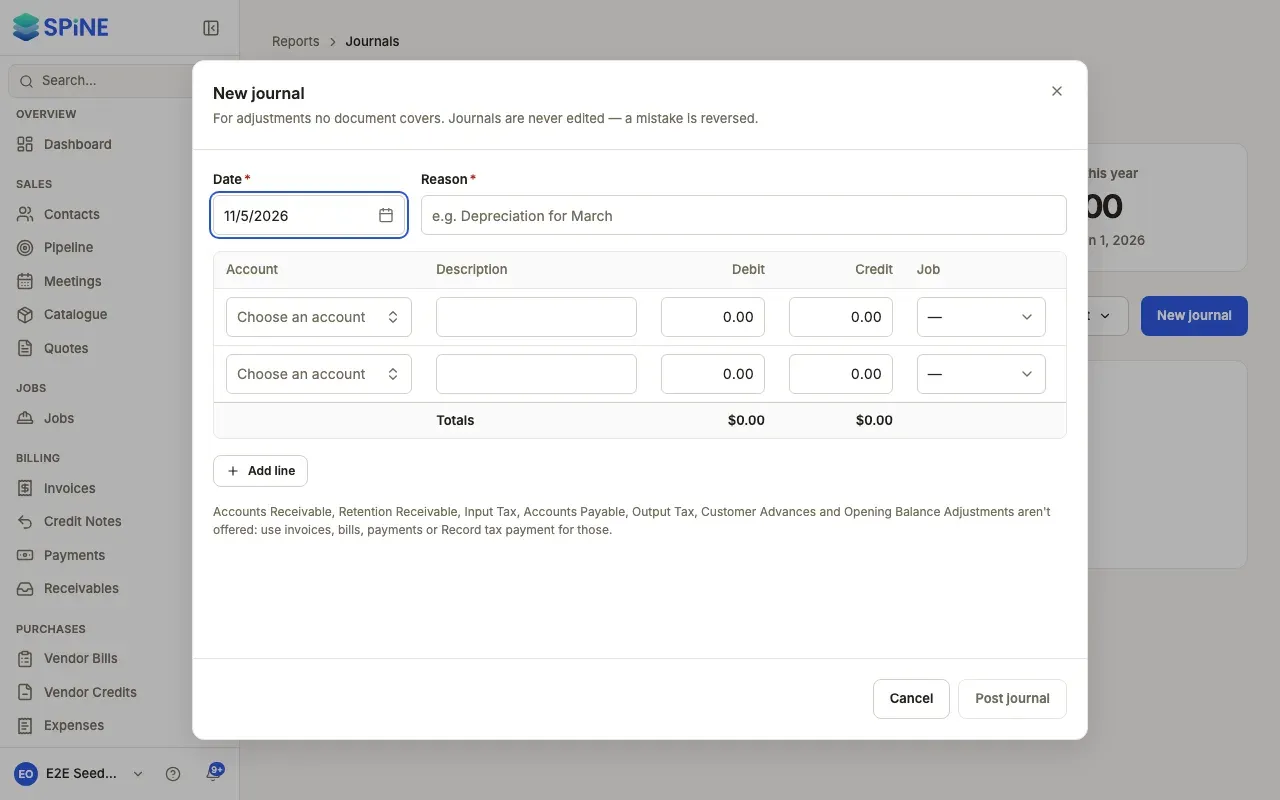
- Set the date and reason — Enter the Date and a Reason, for example “Depreciation for March”. The reason is required.
- Add the lines — For each line, choose the Account, add a Description, and enter a Debit or a Credit. When the Jobs & field module is on, you can tag a line with a Job so it counts in that job’s costing. Press Add line for more lines, or Remove to take one out.
- Balance it — The Totals row shows total debits and credits. Until they match, you see “Debits and credits must be equal — out by amount.” and you can’t post.
- Post it — Press Post journal. It gets the next number, such as JNL-0001, and appears in every report with the source “Journal”.
Accounts you can’t use
Section titled “Accounts you can’t use”Some accounts are kept in step by documents, so a journal can’t change them: Accounts Receivable, Retention Receivable, Input Tax, Accounts Payable, Output Tax, Customer Advances and Opening Balance Adjustments. They aren’t offered in the account picker. Use invoices, bills, payments or Record tax payment for those.
Closed periods
Section titled “Closed periods”You can’t post a journal dated inside a closed period. Spine refuses it with a message that the date falls within a closed fiscal period. Use a date in an open period, or ask an Owner to reopen the period (see Chart of accounts and opening balances).
Last updated with Spine 1.0.0-beta.2