

See the balance sheet
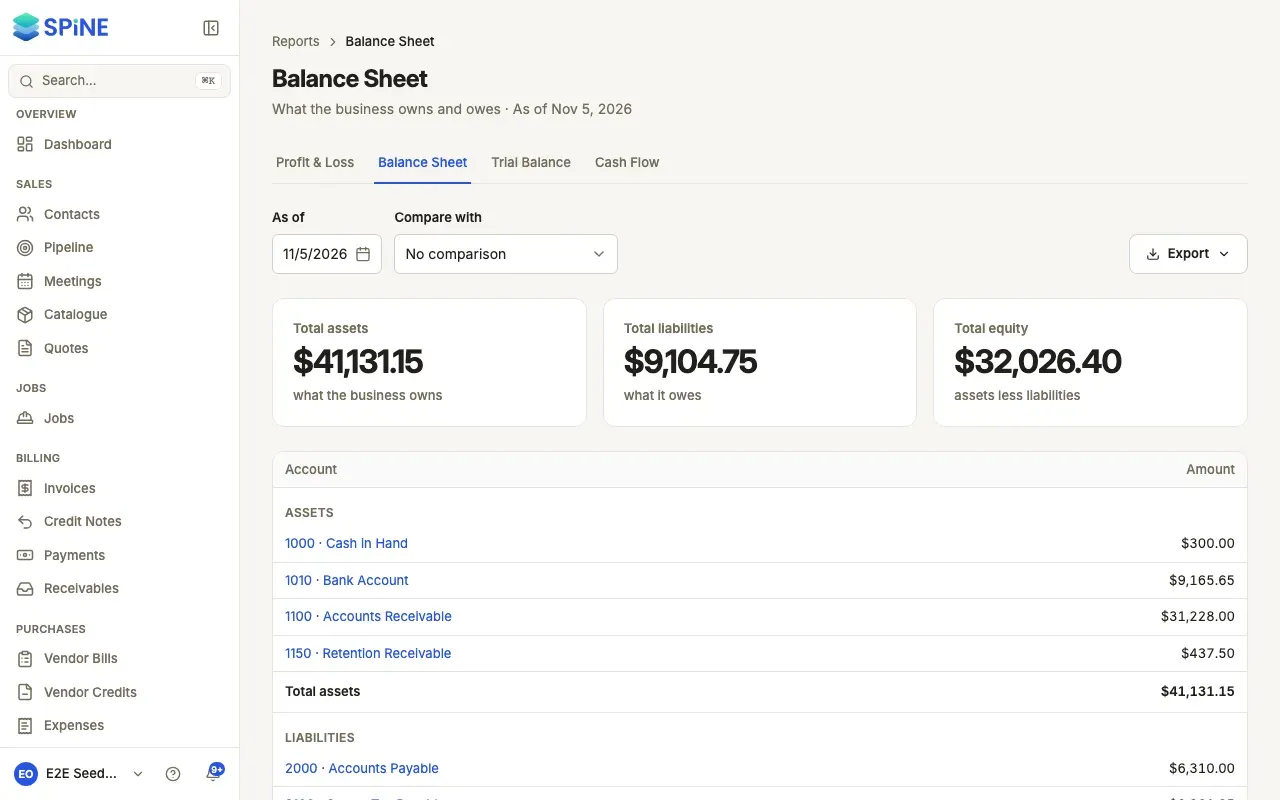
The Balance Sheet shows, on one date, what the business owns (assets), what it owes (liabilities) and what’s left for the owners (equity). Total assets always equal total liabilities plus equity, because every entry in your books balances.
- Open the report — Go to Reports › Balance Sheet, or use the tabs from Profit & Loss.
- Choose the date — Set As of.
- Read it — Assets (what the business owns), Liabilities (what it owes) and Equity (assets less liabilities), each by account with its total, and Total liabilities + equity at the end.
- Click an account — See the entries behind its balance.
Profit not yet closed
Section titled “Profit not yet closed”Profit you’ve made but not closed into retained earnings shows in equity as “Retained Earnings (current period)”. That’s why the sheet balances before any year-end entry.
Compare with last year
Section titled “Compare with last year”Under Compare with, choose Previous year end to show the balance at the end of your previous financial year beside the date you picked.
The Balance Sheet has no cash-basis switch. To export it, press Export (see Export or print a report).
Last updated with Spine 1.0.0-beta.2